If you have a website built with WordPress, you might have heard the term WordPress SEO thrown around, but what does it really mean? Simply put, WordPress SEO is about making your website easy to find on Google and other search engines.
Many people struggle because no matter how good their website looks or how much great content they create, hardly anyone visits. That’s because their site isn’t optimized for search engines.
In this blog, we’ll explore the common problem website owners face with WordPress SEO, why it matters, and how you can fix it step by step — without being a tech expert.
Why WordPress SEO Matters For Your Website
Imagine opening a shop in the middle of nowhere. No matter how good your products are, if no one knows about your shop, you won’t make any sales. The same goes for websites. Without proper SEO (Search Engine Optimization), your WordPress website is invisible to people searching for what you offer.
When your site isn’t optimized, it won’t show up on the first page of Google, and most people don’t look past that. This means lost visitors, fewer customers, and lost opportunities for your business or blog.
Common Challenges Faced while Doing WordPress SEO
Many WordPress users make simple mistakes that hurt their website’s visibility:
- Ignoring SEO basics: They don’t use the right keywords or fail to add meta titles and descriptions.
- Slow website speed: A slow-loading website makes visitors leave quickly and lowers your ranking.
- Poor mobile experience: Many don’t check how their site looks on phones, causing users to bounce.
- Messy website structure: If your pages and posts aren’t organized well, search engines can’t understand your content properly.
- No backlinks or social proof: Links from other websites and social signals help build trust and authority.
All these problems mean your site is harder to find and less likely to rank well on Google.
Read more: Is WordPress Good for SEO in 2026
Effective Solutions to WordPress SEO Problems
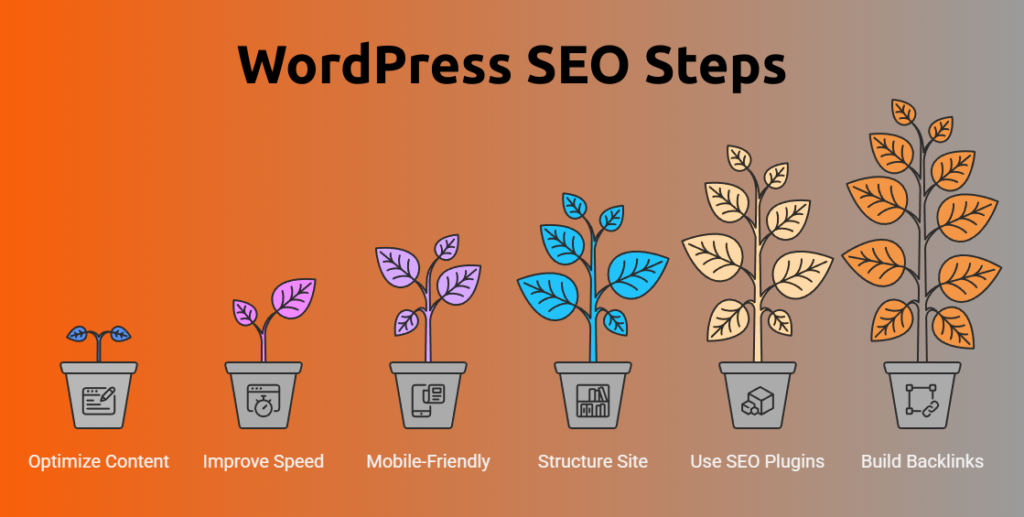
Step 1: Optimize Your Content
Content is king, but only if it’s optimized. Use relevant keywords naturally in your titles, headings, and throughout your posts. Avoid stuffing keywords, which can actually hurt your rankings. Focus on creating helpful, clear content that answers your visitors’ questions.
Step 2: Improve Website Speed
A fast website keeps visitors happy and ranks better on Google. Use lightweight themes, compress images, and use caching plugins to speed up your WordPress site.
Step 3: Make Your Site Mobile-Friendly
More than half of all internet traffic comes from mobile devices. Choose responsive themes and test your site on different devices to ensure it looks great everywhere.
Step 4: Structure Your Site Properly
Use categories and tags wisely to organize your content. Make sure your navigation is simple and logical so visitors and search engines can find pages easily.
Step 5: Use SEO Plugins
WordPress offers powerful SEO plugins like Yoast SEO or Rank Math that guide you in optimizing your pages. These tools help you add meta titles, descriptions, XML sitemaps, and more without coding.
Step 6: Build Authority with Backlinks
Encourage other trustworthy websites to link to your site by creating valuable content and networking with bloggers or businesses in your niche.
FAQs on WordPress SEO
Why is WordPress SEO so difficult to solve?
SEO can feel complicated because it involves many small details like keywords, site speed, and backlinks. But breaking it down step by step makes it manageable.
What common mistakes make SEO worse on WordPress?
Keyword stuffing, ignoring site speed, not using SEO plugins, and poor site organization are common errors that lower rankings.
How long does it take to see SEO results?
SEO results usually take a few weeks to several months to appear because search engines need time to crawl and index your site.
Are there risks involved with SEO?
Using “black-hat” SEO techniques like keyword stuffing or buying links can get your site penalized by Google. Always follow best practices.
What should I avoid while fixing WordPress SEO?
Avoid overloading your site with too many plugins, copying content from others, and neglecting mobile optimization.
Conclusion
WordPress SEO is essential for anyone who wants their website to be seen, trusted, and visited by the right audience. By understanding the common problems, recognizing the pain points, and applying simple solutions, you can boost your website’s visibility and grow your online presence.
If you’re ready to take your WordPress website to the next level but feel overwhelmed, don’t worry — professional WordPress SEO services can help.
Get Started Today
We are always here to
help you achieve the unimaginable

Feel free to reach out or explore expert SEO help tailored for WordPress to get better rankings and more visitors today!