You built the website. You published pages, added services, wrote a couple of blogs, and waited. But the traffic? It just never came. Or maybe it trickled in for a while and then quietly disappeared.
If you’re staring at Google Analytics and wondering what went wrong- you’re definitely not alone. This is one of the most common frustrations we hear from business owners. And the honest answer is: there’s almost always a fixable reason behind it.
In this blog, we’re going to walk through the real reasons why websites don’t get traffic- no fluff, no vague advice— and more importantly, what you can actually do about each one.
1. Google Hasn’t Indexed Your Website Yet
This one surprises a lot of people. Just because your website is live doesn’t mean Google knows about it.
Search engines send out what are called ‘crawlers’- they visit websites, read the content, and add pages to their index. Until your pages are indexed, they literally cannot show up in search results. No index, no traffic.
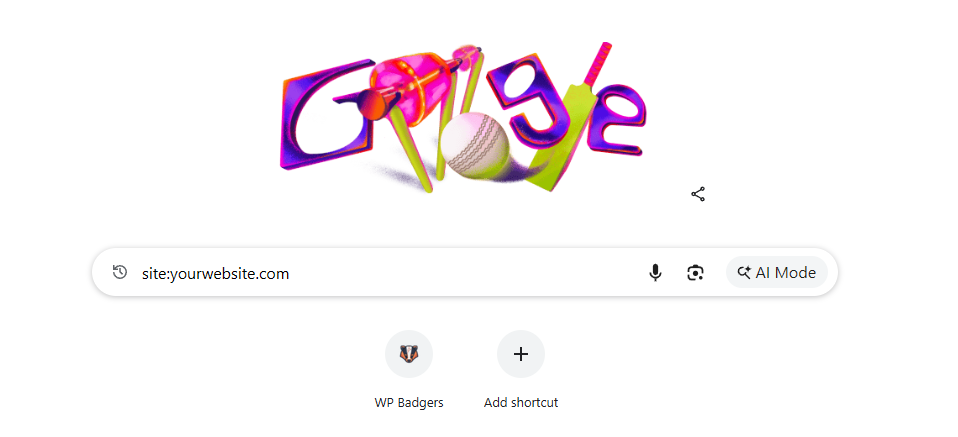
How to check: Go to Google and type site:yourwebsite.com- if nothing comes up, your site isn’t indexed.
What to do about it:
- Submit your sitemap to Google Search Console (it’s free)
- Make sure the ‘Discourage search engines’ setting is OFF in your WordPress dashboard- this is a surprisingly common mistake after launching a new site
- Request indexing directly from Google Search Console for your most important pages
To understand how rankings actually improve, read our detailed guide on What Is WordPress SEO and Why Is It Important?
2. You’re Targeting Keywords Nobody Searches For
Here’s a hard truth- you might be writing great content, but if no one is searching for the words you’re using, you’ll never rank for them.
Keyword research isn’t about stuffing your page with buzzwords. It’s about understanding exactly what your potential customers are typing into Google, and then creating content that answers those specific queries.
For example, if you run a bakery in Noida, ranking for ‘best artisan handcrafted confectionery Noida’ is going to be much harder- and less effective- than ranking for ‘custom cakes Noida’ or ‘birthday cake delivery near me’.
The sweet spot: keywords with decent monthly search volume but not too much competition. Tools like Google Keyword Planner, Ubersuggest, or Ahrefs can help you find these.
What to do about it:
- Research keywords before writing any content, not after
- Target a mix of short-tail and long-tail keywords
- Check what keywords your competitors are ranking for
3. Your On-Page SEO Is Either Missing or Done Wrong
On-page SEO is what tells Google what your page is about. Without it, even good content struggles to rank.
The basics matter more than people realize. Things like your page title, meta description, heading tags (H1, H2, H3), image alt text, and internal links- they all work together to help Google understand and rank your content.
What commonly goes wrong:
- Multiple H1 tags on a single page
- Title tags that don’t include the target keyword
- Images with generic names like ‘IMG_0045.jpg’ instead of descriptive ones
- Pages with very little actual text content
- No internal links connecting your pages together
What to do about it:
- Install a plugin like Yoast SEO or Rank Math on your WordPress site- they guide you through on-page optimization
- Write unique title tags and meta descriptions for every page
- Use your primary keyword in the H1 and naturally throughout the content
- Add descriptive alt text to every image
4. Your Website Loads Too Slowly
We live in an impatient world. Research consistently shows that most visitors leave a website if it takes longer than 3 seconds to load. And Google knows this- page speed is a confirmed ranking factor.
A slow website hurts you twice: it drives away visitors before they even see your content, and it pushes your rankings down so fewer people find you in the first place.
Test your speed right now: Run your site through Google PageSpeed Insights (free tool) and see your score.
Common causes of a slow WordPress site:
- Large, uncompressed images
- Too many plugins running simultaneously
- Cheap, shared hosting that can’t handle your traffic
- No caching plugin installed
- Unoptimized theme with too many scripts loading
What to do about it:
- Compress images before uploading (or use a plugin like ShortPixel)
- Install a caching plugin like WP Rocket or W3 Total Cache
- Consider upgrading your hosting if you’re on the cheapest shared plan
- Audit your plugins and deactivate the ones you don’t actually use
Not sure which approach fits your website? Check out our comparison on WordPress SEO Services vs General SEO Services.
5. Your Website Isn’t Mobile-Friendly
More than half of all web traffic today comes from mobile devices. If your website looks broken or is hard to use on a phone, you’re losing a huge chunk of potential visitors- and Google will rank you lower because of it.
Google now uses ‘mobile-first indexing’, which means it primarily looks at the mobile version of your site when deciding rankings. If your desktop site looks great but your mobile version is a mess, your rankings suffer accordingly.
What to do about it:
- Use a responsive WordPress theme that automatically adjusts to screen sizes
- Test your site on multiple devices- don’t just check on your own phone
- Use Google’s Mobile-Friendly Test tool to identify specific issues
- Make sure buttons and links are easy to tap on small screens
6. You Have Little to No Backlinks
Backlinks are links from other websites pointing to yours. Google treats them like votes of confidence- the more credible sites that link to you, the more authority your site gains.
A brand new website with zero backlinks is at a serious disadvantage. Even if your content is excellent, Google has no reason to trust you yet. Established competitors with hundreds or thousands of backlinks will almost always outrank you on competitive keywords.
What to do about it:
- Start by getting listed in relevant online directories (Google Business Profile, Justdial, Sulekha, etc.)
- Write guest posts for other websites in your industry
- Create genuinely useful resources that other websites would want to link to
- Reach out to local businesses or partners for mutual mentions
- Build relationships in your niche- networking online works the same as offline
Don’t buy cheap backlinks from shady sources. Google is smart enough to spot them, and they can actually get your site penalized.
7. Your Content Doesn’t Match What People Are Actually Looking For
This is called search intent- and it’s one of the most overlooked parts of SEO.
Even if you rank for the right keyword, if your content doesn’t match what the person actually wanted when they searched for it, they’ll leave immediately. Google tracks this, and it will push your ranking down.
For example, someone searching for ‘how to fix WordPress login error’ wants a step-by-step tutorial- not a page trying to sell them a WordPress support package. Give people what they came for first.
Four types of search intent to know:
- Informational- they want to learn something (‘what is SEO’)
- Navigational- they’re looking for a specific website (‘WP Badgers contact’)
- Commercial- they’re comparing options (‘best SEO tools 2025’)
- Transactional- they’re ready to buy or act (‘hire SEO agency Noida’)
What to do about it:
- Before writing content, search for your target keyword yourself and see what type of pages rank
- Match your content format to what’s already working (guides, lists, comparisons, landing pages)
- Answer the question clearly and quickly- don’t make people scroll forever to find it
8. You’re In a Very Competitive Niche Without Enough Authority
Some industries are incredibly competitive online. If you’re a new insurance website trying to rank against HDFC Life and LIC, or a new e-commerce store going head-to-head with Amazon- that’s going to take time and serious investment.
This doesn’t mean it’s impossible, but it does mean you need a realistic strategy. Instead of going after the most competitive keywords first, start by targeting more specific, lower-competition queries that your ideal customers are still searching for.
What to do about it:
- Focus on local SEO first- it’s easier to rank for ‘SEO agency Noida’ than ‘SEO agency India’
- Target very specific long-tail keywords where competition is lower
- Build your site’s authority gradually through consistent content and backlinks
- Be patient- SEO for competitive niches takes months, not days
9. Technical Issues Are Blocking Your Site
Sometimes the problem isn’t your content or your links- it’s something broken under the hood. Technical SEO issues can quietly tank your rankings without any obvious signs.
Common technical problems that kill traffic:
- Broken links (404 errors) throughout your site
- Duplicate content- multiple URLs showing the same content
- Missing or incorrect canonical tags
- Your SSL certificate has expired (your site shows as ‘not secure’)
- Pages that are accidentally blocked from Google via robots.txt
- Sitemap errors in Google Search Console
What to do about it:
- Set up Google Search Console and regularly check for errors
- Use a tool like Screaming Frog (free for up to 500 URLs) to crawl your site and find broken links
- Make sure your site runs on HTTPS, not HTTP
- Review your robots.txt file to ensure you’re not blocking important pages
If your rankings are stuck, don’t miss our guide on WordPress SEO Not Working? Here’s How to Fix It Fast.
10. You Published Content and Then Did Nothing
A lot of people think SEO is a one-time job. You write a blog, optimize it, hit publish, and wait for traffic to flow in. That’s not quite how it works.
Search engines favor websites that are consistently active. Fresh content, regular updates, new backlinks- all of these signal to Google that your site is alive and worth ranking.
What to do about it:
- Publish new content on a consistent schedule- even once or twice a month makes a difference
- Go back and update older posts with new information
- Promote your content on social media and through email- traffic from those sources also signals relevance
- Build a content calendar so you’re never scrambling for ideas
Quick Checklist- Is Your Website Doing These?
- Submitted sitemap to Google Search Console
- Site is indexed and crawlable
- Each page targets a specific keyword
- On-page SEO basics are in place (title, H1, meta description)
- Site loads in under 3 seconds
- Website is mobile-responsive
- You have at least some backlinks from credible sources
- Content matches the search intent of your target keywords
- No major technical errors in Google Search Console
- You’re publishing content regularly
Final Thoughts
Getting traffic to your website isn’t magic- it’s a combination of the right strategy, consistent effort, and fixing what’s broken. Most websites that struggle with traffic have one or more of the issues above, and the good news is every single one of them is fixable.
If you’ve gone through this list and still can’t figure out why your website isn’t getting visitors, the problem might need a more detailed audit. Sometimes the issues are subtle and require a professional eye to catch.
Ready to Get Real Traffic to Your Website?
At WP Badgers, we work with WordPress websites every day- fixing exactly the kinds of problems we’ve talked about in this post. Whether it’s an SEO audit, fixing technical issues, or building a long-term strategy to grow your organic traffic, we’d love to help.
Get Started Today
We are always here to
help you achieve the unimaginable