If you have a WordPress website but it’s not showing up on Google, you’re not alone. Many beginners publish good content but still get zero traffic.
The reason is simple: WordPress alone is not SEO-ready. In this guide, I’ll break down WordPress SEO optimization techniques for 2026 in plain language—no coding, no jargon—so your site can actually rank and get clicks.
What Is WordPress SEO Optimization Techniques?
WordPress SEO optimization is the process of improving your WordPress website so search engines like Google can easily understand, rank, and show it to users.
It includes technical setup, content optimization, site speed, and user experience improvements that help your pages appear higher in search results and attract organic traffic.
Why Does WordPress SEO Optimization Matter?
How This Problem Affects Users
If your WordPress site isn’t SEO-optimized, Google may ignore it—even if your content is helpful. I’ve seen beginners spend months writing blogs but get no visitors because their pages weren’t indexed properly, loaded slowly, or targeted wrong keywords.
This leads to lost traffic, fewer leads, and wasted effort.
Common Myths or Misunderstandings
Many people believe:
- “WordPress is SEO-friendly by default” (partly true, but not enough)
- “Installing one SEO plugin is enough”
- “SEO is a one-time setup”
In reality, SEO in 2026 is ongoing and user-focused. Google now prioritizes helpful content, real experience, and site performance, not shortcuts.
Common Challenges People Face With WordPress SEO Optimization
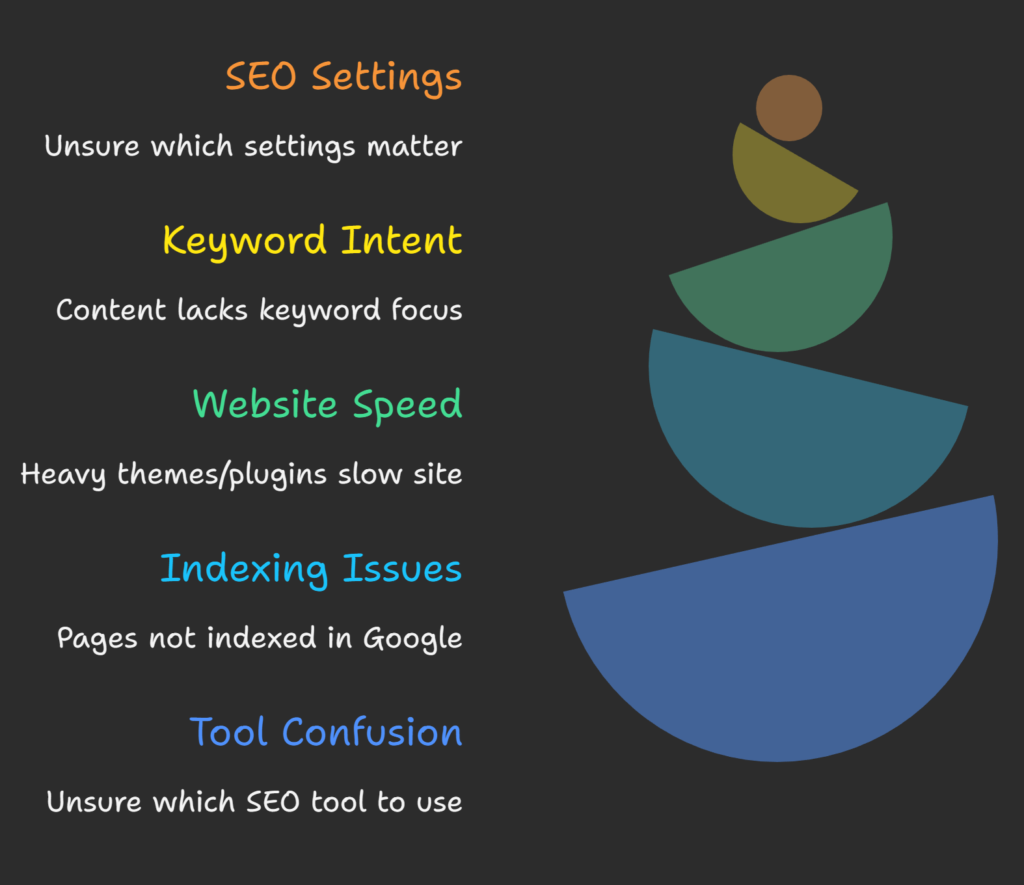
Beginners usually struggle with:
- Not knowing which SEO settings actually matter
- Writing content without keyword intent
- Slow website speed due to heavy themes/plugins
- Pages not getting indexed in Google Search Console
- Confusion between tools like Yoast, Rank Math, and All in One SEO
Ignoring these issues can result in low rankings, poor user trust, and zero organic growth.
Read More: What Is WordPress SEO and Why Is It Important?
How to Do WordPress SEO Optimization the Right Way in 2026
Step 1 – Set Up the Right SEO Foundation
Start by setting up WordPress correctly for search engines.
What to do:
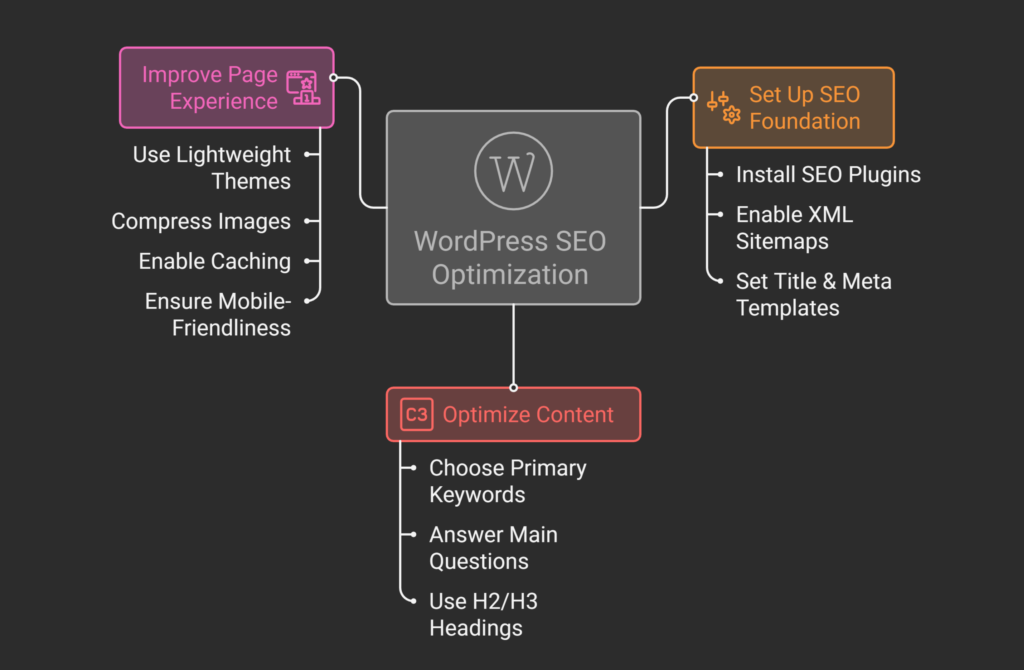
- Install Rank Math SEO or Yoast SEO
- Enable XML sitemaps
- Set correct title & meta description templates
- Check “Search Engine Visibility” is unchecked in WordPress settings
Why it works:
SEO plugins help Google crawl and understand your site structure. According to Google Search Central, clean site architecture and metadata improve crawl efficiency and indexing.
Tools to use:
Google Search Console, Rank Math / Yoast, Google Analytics 4
Step 2 – Optimize Content for Search Intent (Not Just Keywords)
Every page should solve one clear user problem.
How to apply it correctly:
- Choose one primary keyword per page
- Answer the main question in the first 2–3 lines
- Use H2/H3 headings with questions users actually ask
- Add internal links to related posts
Common mistakes to avoid:
- Keyword stuffing
- Writing for bots instead of humans
- Copying content from competitors
From my experience, pages that clearly answer “what, why, and how” tend to win Featured Snippets and People Also Ask results.
Step 3 – Improve Page Experience & Core Web Vitals
In 2026, user experience is SEO.
Best practices:
- Use a lightweight theme like Astra or GeneratePress
- Compress images with ShortPixel or Imagify
- Enable caching using WP Rocket or LiteSpeed Cache
- Make sure your site is mobile-friendly
Google’s Core Web Vitals (LCP, INP, CLS) directly influence rankings, as confirmed in Google’s official documentation.
Learn How to Choose the Best WordPress SEO Service Provider
Frequently Asked Questions About WordPress SEO Optimization
Why is WordPress SEO optimization difficult for beginners?
Because SEO involves multiple areas—content, technical setup, and user experience. Beginners often focus only on plugins and ignore search intent and site performance, which are critical ranking factors today.
What mistakes make WordPress SEO worse?
Common mistakes include keyword stuffing, using heavy themes, ignoring mobile optimization, not submitting sitemaps to Google Search Console, and publishing thin or copied content.
How long does WordPress SEO optimization take to show results?
Usually 3–6 months for new websites. Results depend on competition, content quality, and consistency. SEO is not instant, but it compounds over time.
Are there any risks involved in SEO optimization?
Yes, using black-hat tactics like buying links or stuffing keywords can cause Google penalties. Always follow Google’s Helpful Content and Spam policies.
What should I avoid while optimizing WordPress for SEO?
Avoid too many plugins, duplicate content, auto-generated AI content without human editing, and ignoring user intent. Simplicity and clarity work best.
Final Thoughts: Key Takeaways
- WordPress needs proper SEO setup, not just a plugin
- Focus on user problems and search intent, not tricks
- Site speed and experience matter more than ever
- SEO is a long-term investment, not a one-time task
If you want faster, safer results—or don’t want to risk mistakes—you can work with a WordPress SEO expert who understands real-world ranking strategies for 2026.
Start applying these steps today, or get professional help to grow your WordPress traffic the right way.
Get Started Today
We are always here to
help you achieve the unimaginable