
Key Takeaways
- No Code is King: Modern WordPress tools allow anyone to create professional layouts without touching a single line of CSS or HTML.
- The Power of Page Builders: Plugins like Elementor, Beaver Builder, and SeedProd are the industry standards for high-converting designs.
- Structure Matters: A successful landing page requires a clear hierarchy: Hero section, Social Proof, Features, and a singular CTA.
- Mobile-First Design: Over 60% of web traffic is mobile; your landing page must be responsive to capture these leads.
- Speed & SEO: Visual beauty is useless if the page loads slowly or isn’t optimized for search engines.
- Conversion Optimization: A/B testing and clear value propositions are essential to turning visitors into customers.
Did you know that the average landing page conversion rate across all industries is around 2.35%? Here’s where things get interesting: the top 10% of companies achieve conversion rates of 11.45% or even higher.
So, what’s their secret?
Well, it’s usually not just one thing. A landing page that converts well typically combines a clean design, fast loading speed, clear messaging, and a strong call to action. In other words, it makes it easy for visitors to understand what you’re offering and what they should do next.
Now, let’s be honest. Many business owners think they need to hire an expensive developer or spend weeks learning HTML and CSS just to build a professional-looking landing page. But that’s not necessarily true anymore.
With the right tools, you can create a great-looking landing page in WordPress without writing a single line of code.
And here’s something else worth knowing: WordPress SEO services can help improve your website’s search visibility, optimize your content, boost page speed, and attract more organic traffic. When your landing page is optimized properly, it can also help turn those visitors into actual leads and paying customers.
The best part? You don’t have to be a tech expert to get started. In many cases, you can build and publish a solid landing page in just a few hours, depending on your design and content requirements.
Whether you’re launching a new product, collecting email signups, promoting a service, or running a marketing campaign, WordPress gives you plenty of options to create a professional landing page without making the whole process complicated.
But here’s the big question: How do you actually create a landing page that looks good, loads quickly, and gets people to take action?
That’s exactly what we’re going to walk through.
In this guide, we’ll show you how to build a WordPress landing page without coding, with a focus on both design and performance. We’ll cover everything from choosing the right tools and organizing your content to creating a clear page layout that guides visitors toward your goal.
We’ll also get into the technical details that matter, including page speed, SEO, mobile responsiveness, and user experience. After all, a landing page shouldn’t just look good on the screen. It should also work smoothly for real people and make it easy for them to take the next step.
By the end of this guide, you’ll know how to create a professional WordPress landing page that loads fast, communicates your message clearly, and gives visitors a compelling reason to take action—all without getting stuck in complicated coding or technical setup.
1. Choosing the Right Tools: Best WordPress Landing Page Plugins
Before you start dragging elements onto a canvas, you need to select your “engine.” While the native WordPress Block Editor (Gutenberg) has improved significantly, professional marketers usually turn to dedicated plugins for more control and advanced features.
The Rise of Drag and Drop Landing Page WordPress Builders
A drag and drop landing page WordPress builder is a plugin that replaces the standard editor with a visual, “What You See Is What You Get” (WYSIWYG) interface. These tools allow you to move text boxes, images, and buttons anywhere on the page.
The primary benefit here is the elimination of the “preview” loop. You no longer need to save your draft and refresh a new tab to see how a change looks; the changes happen live as you make them. For beginners, this is the single most important factor in a WordPress landing page builder tutorial.
Comparing Top-Tier Plugins
When looking for the best WordPress landing page plugins, three names consistently rise to the top:
- SeedProd: Specifically designed for landing pages and coming soon pages. It is lightweight and incredibly easy for beginners.
- Elementor: The most popular choice globally, offering thousands of templates and advanced design widgets.
- Beaver Builder: Known for its stability and “clean” code, making it a favorite for those who prioritize site speed.
| Feature | SeedProd | Elementor | Beaver Builder |
| Ease of Use | High | Medium | High |
| Template Library | Excellent | Massive | Good |
| Speed/Performance | Very Fast | Average | Fast |
| Free Version | Limited | Robust | Limited |
Why “No Code” Doesn’t Mean “Low Quality”
There is a lingering myth that a no code WordPress landing page is somehow inferior to a hand-coded one. In 2026, this is false. Modern builders output clean, minified code that is highly readable for search engines. Furthermore, they allow for “Global Styles,” ensuring your branding remains consistent across every section of your site without manual adjustments.
2. Planning Your Strategy: How to Design Landing Page Without Coding
A common mistake is jumping straight into the design without a blueprint. A landing page is not a blog post; it is a conversion machine. Every element must serve a purpose.
Defining Your Primary Goal
What is the one thing you want the visitor to do? If you give them three options—sign up for a newsletter, watch a video, and buy a product—they will likely do none. This is “Analysis Paralysis.” Your beginner guide to WordPress landing pages starts with a singular focus.
- Lead Generation: Collecting emails or phone numbers.
- Direct Sale: Pushing the user to a checkout page.
- Brand Awareness: Encouraging a video view or social share.
The Anatomy of a High-Converting Page
To create landing page in WordPress step by step, you must follow a proven psychological flow. Most high-performing pages follow this structure:
- The Hero Section: A bold headline, a subheadline, and a clear Button (CTA).
- The Problem/Solution: Clearly state the pain point your audience feels and how you solve it.
- Features & Benefits: Don’t just list what you do; explain how it makes the user’s life better.
- Social Proof: Testimonials, logos of past clients, or case study data.
Actionable Tip: Write Your Copy First
Never design around “Lorem Ipsum” (filler text). Write your headlines and body text in a separate document first. Designing with real words allows you to see if a headline is too long for a specific layout or if your call to action needs more visual weight.
3. Setting Up Your Foundation in WordPress
Now that you have your plan and your plugin, it’s time to get technical. To build a landing page in WordPress without coding, you need a clean environment.
Creating a Blank Canvas
Most WordPress themes include headers, footers, and sidebars. For a landing page, these are distractions. You want a “Landing Page Template” or “Canvas” mode.
- In Elementor, you can select “Elementor Canvas” under Page Attributes.
- In SeedProd, this is done automatically as it creates a standalone page.This removes the navigation menu, preventing users from clicking away to your “About” or “Contact” pages.
Configuring Global Settings
Before adding your first image, set your Global Fonts and Global Colors within your page builder. This ensures that every H1, H2, and button you create later will automatically match your brand colors. This is a key step in an easy landing page creation WordPress workflow because it saves you from manually styling 20 different buttons.
Integrating with Your Marketing Stack
Your landing page is an island unless it connects to your tools. You will need to link your lead forms to an Email Service Provider (ESP) like Mailchimp, HubSpot, or Klaviyo. Most WordPress page builders for landing pages have “Direct Integrations” where you simply paste an API key to sync your data.
4. The Hero Section: Mastering the First Impression
The “Above the Fold” area—what a user sees without scrolling—is the most valuable real estate on your website. If you fail here, the rest of the page doesn’t matter.
Crafting the Perfect Headline
Your headline should be benefit-driven. Instead of “We Sell SEO Services,” try “Double Your Organic Traffic in 90 Days.” This addresses the user’s desire immediately. When you how to design landing page without coding, use your builder’s typography settings to make this text large, bold, and easy to read.
The Role of Visuals in a No Code Layout
A hero image or video should complement the text, not distract from it. Use high-quality photography or custom illustrations. If you are using a background image, ensure there is enough contrast (often achieved via an “Overlay”) so the text remains legible.
Call to Action (CTA) Placement
The CTA button should be a contrasting color. If your page is mostly blue, use an orange or yellow button. In any WordPress landing page builder tutorial, you’ll learn that the button text should be actionable: “Get Started,” “Download Now,” or “Claim My Discount.”
5. Building Trust: Social Proof and Credibility
In a digital world, trust is the currency of conversion. Visitors are naturally skeptical. You must prove that you are a legitimate entity that delivers on its promises.
Strategic Testimonial Placement
Don’t just bury testimonials at the bottom. Place a “micro-testimonial” (a one-sentence quote) right under your hero CTA. This provides immediate reassurance. In your no code WordPress landing page, use a “Testimonial Carousel” or “Grid” widget to display these elegantly.
Trust Badges and Certifications
If you’ve been featured in the news, or if you use secure payment gateways like Stripe or PayPal, show those logos. These are known as “Trust Signals.” For a local business, mentioning you are based in a specific area, like a WordPress SEO agency in Noida, can also build regional trust.
Real-World Example: The “Before and After”
If you are in a visual industry (like web design or fitness), a “Before and After” slider widget is incredibly powerful. It provides undeniable proof of your expertise. When you build a landing page in WordPress without coding, these widgets are usually just a matter of uploading two images and clicking “Save.”
6. Mobile Optimization and Performance
As mentioned earlier, mobile traffic is dominant. A landing page that looks great on a desktop but breaks on an iPhone is a wasted investment.
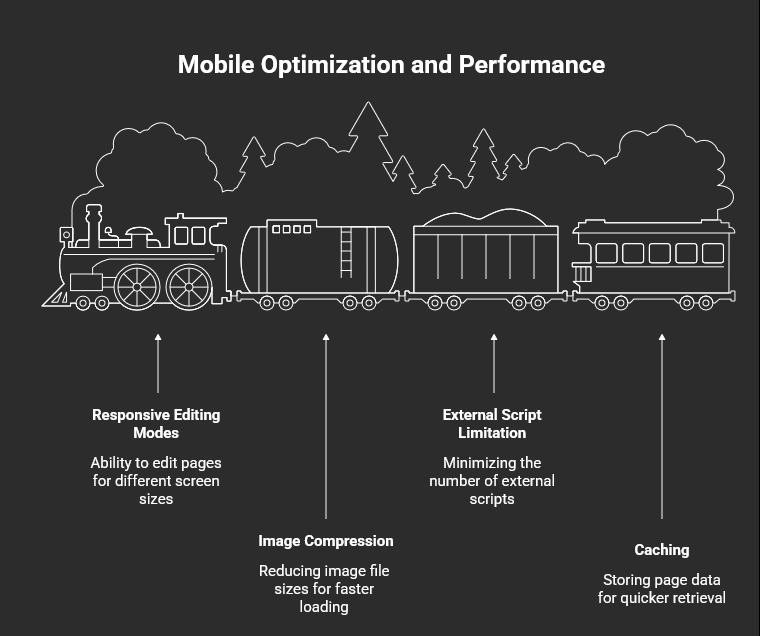
Responsive Editing Modes
One of the best features of modern WordPress page builders for landing pages is the ability to switch views. You can edit your page in “Mobile View” and hide certain heavy images or adjust font sizes specifically for smaller screens without affecting the desktop version.
Speed Optimization for Landing Pages
Page speed is a direct ranking factor for SEO and a conversion killer for ads. If your page takes longer than 3 seconds to load, 53% of mobile users will leave.
- Compress Your Images: Use tools like TinyPNG or plugins like ShortPixel.
- Limit External Scripts: Don’t overload your page with too many tracking pixels or heavy animations.
- Use Caching: Ensure you have a solid caching plugin like WP Rocket or NitroPack.
SEO for AI Search Engines
In 2026, search is changing. To ensure your landing page is found by AI search engines, you need to use clear, descriptive H2 and H3 headings. Naturally include terms like E-E-A-T SEO strategy 2026 if they are relevant to your niche. This helps AI models understand the context and authority of your page.
To take your technical optimization to the next level, you might want to explore professional WordPress SEO services to ensure your landing page isn’t just pretty, but also discoverable.
7. Advanced Conversions: A/B Testing and Analytics
You’ve built the page, but the work isn’t done. The best marketers are constantly testing.
Setting Up Google Analytics 4 (GA4)
You need to know where your traffic is coming from and where they are dropping off. Use a plugin like MonsterInsights to connect your WordPress site to GA4 without touching code. Track “Button Clicks” as conversions to see which parts of your page are working.
What to A/B Test First
A/B testing involves showing two versions of a page to different users to see which performs better.
- The Headline: Test two different value propositions.
- CTA Color: Does a red button outperform a green one?
- Lead Form Length: Does asking for a phone number decrease signups significantly?
Using Heatmaps
Tools like Hotjar or Clarity show you “Heatmaps”—visual representations of where people click and how far they scroll. If users aren’t reaching your social proof section, you might need to move it higher up in your create landing page in WordPress step by step process.
8. Launching and Maintaining Your Landing Page
The final step in your beginner guide to WordPress landing pages is the “Go Live” phase.
The Pre-Launch Checklist
Before you drive paid traffic to your new page, check the following:
- Links: Do all buttons lead to the correct destination?
- Forms: Does the notification email actually land in your inbox?
- Legal: Do you have a Privacy Policy and Terms of Service linked in the footer? (Crucial for Google and Meta Ads).
Regular Maintenance
WordPress updates frequently. Every month, log in to ensure your page builder and WordPress core are updated. Check your page on a real mobile device to ensure nothing has shifted due to a theme update.
Building a high-converting page is a skill that pays dividends. Whether you are doing it yourself or looking for a professional touch, focusing on user experience and clarity will always yield the best results.
Expert Support from WP Badgers
Building a landing page can be a fun DIY project, but if you’re looking to scale rapidly or need a complex, custom-coded solution that integrates deeply with your CRM, we’re here to help. At WP Badgers, we specialize in high-performance WordPress development and SEO. We have helped over 80+ businesses grow online by creating digital experiences that don’t just look good—they convert.
Ready to take your online presence to the next level? WP Badgers is your partner in growth.
FAQ: WordPress Landing Pages Without Coding
1. Is a landing page different from a homepage?
Yes. A homepage is a general hub with many links (About, Blog, Services). A landing page is a focused page with a single goal and a single call to action. It is designed to minimize distractions and guide the user toward a specific conversion.
2. Do I need a specific theme to build a landing page?
Not necessarily, but using a “lightweight” theme like Astra, Hello Elementor, or GeneratePress makes the process easier. These themes are designed to work perfectly with page builders, giving you a blank canvas to build a landing page in WordPress without coding.
3. Which is the easiest plugin for beginners?
SeedProd is widely considered the most beginner-friendly because it is a dedicated landing page builder. It doesn’t overwhelm you with the complexities of full-site editing, making it perfect for an easy landing page creation WordPress experience.
4. How do I make my landing page load faster?
The biggest culprits for slow pages are unoptimized images. Use a plugin to compress images, avoid using too many large video backgrounds, and choose a high-quality WordPress hosting provider. Speed is essential for keeping no code WordPress landing page visitors engaged.
5. Can I build a landing page for free in WordPress?
Yes. You can use the free versions of Elementor or the native Gutenberg editor. While you might have fewer templates and advanced widgets, you can still create landing page in WordPress step by step without spending a dime on software.
6. Do I need a domain name for my landing page?
If you already have a WordPress site, your landing page will exist as a subfolder. If you are starting from scratch, you will need a domain and hosting before you can begin your WordPress landing page builder tutorial.
7. Is a landing page good for SEO?
Yes, if optimized correctly. Use relevant keywords in your headers, ensure fast load times, and provide high-quality content. However, most landing pages are used for paid ads (Google/Facebook), where the focus is more on conversion than organic ranking.
Conclusion
Learning how to build a landing page in WordPress without coding is honestly one of the most useful skills a business owner or marketer can have. You don’t have to be a developer or know how to write code. With drag-and-drop page builders, you can create a landing page that looks professional and, more importantly, is built around what your audience actually needs.
In this guide, we’ve gone over the tools you’ll need, how to structure a landing page that gets people to take action, and some of the technical things you shouldn’t overlook, like page speed, mobile responsiveness, and security. But here’s the thing: your landing page doesn’t have to be perfect from day one. Think of it as a work in progress. Get your Version 1.0 live, see how people interact with it, check your data, and then keep making improvements based on what you learn.
At the end of the day, you don’t need to be a coding expert to build a successful landing page. What really matters is understanding your customers, knowing what they’re looking for, and making it as easy as possible for them to find the solution you’re offering.
So, go ahead and build that first version. Once it’s live, you can test, tweak, and improve it—and over time, you’ll have a landing page that can bring in better results and more conversions.
Contact WP Badgers today for a free SEO consultation. Let us help you turn your website into a growth engine. Book your consultation here.