
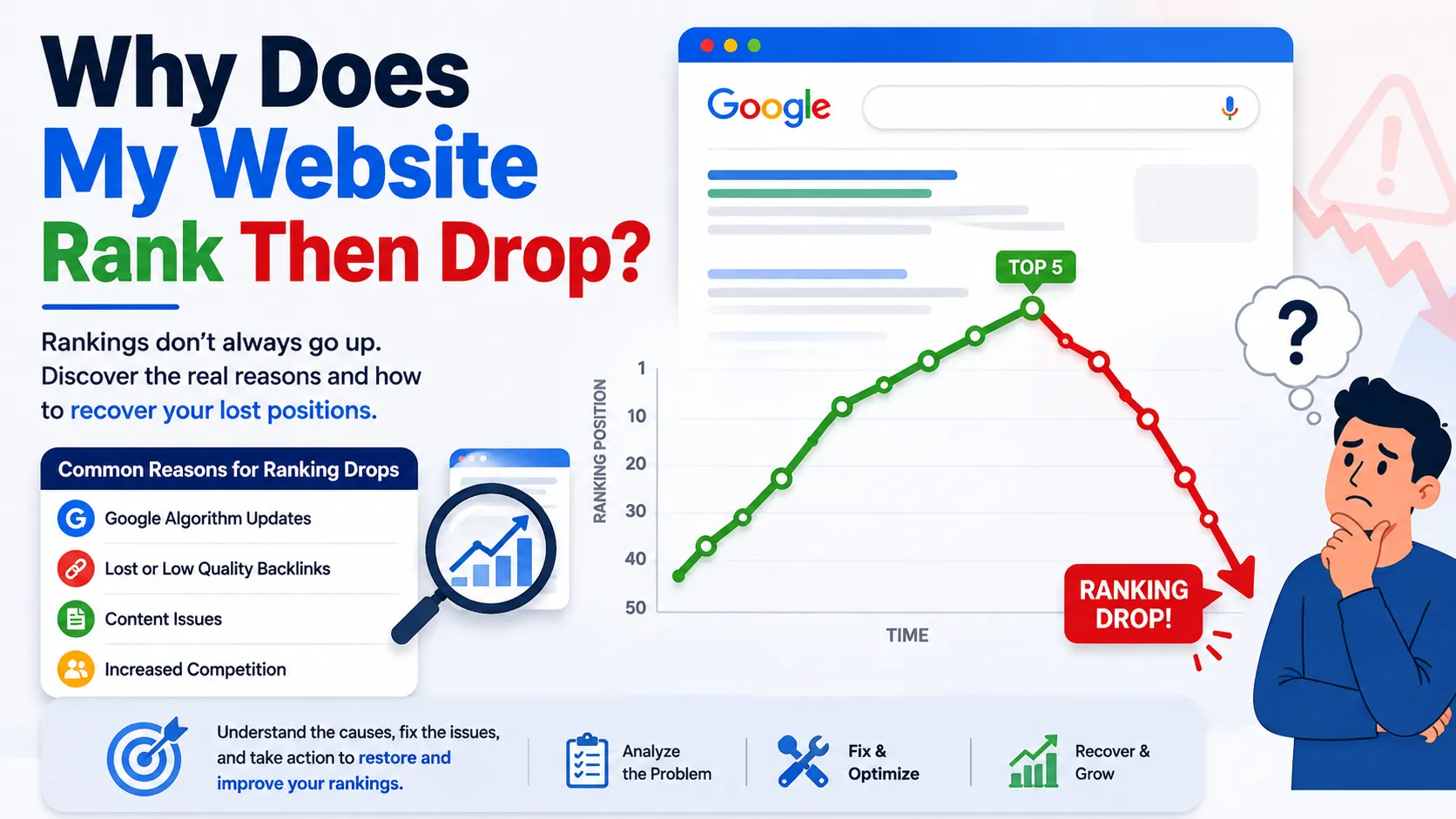
You finally see it happen. Your page makes it into the top 10, maybe even the top 5, and for a few days or weeks, things are looking great. Traffic starts coming in, clicks go up, and you feel like your SEO efforts are finally paying off.
Then, out of nowhere, your rankings start dropping. Your traffic takes a hit, the clicks slow down, and you’re left looking at Google Search Console thinking, “Wait, what just happened?”
If that sounds familiar, trust me, you’re not the only one dealing with it. Why does my website rank then drop? is one of the most common questions website owners ask. And the truth is, there isn’t always one simple answer.
Sometimes, it’s just Google ranking fluctuations. Other times, there may be a technical SEO issue, stronger competition, a change in search intent, or even an algorithm update behind the drop. And yes, some ranking drops can happen even when you haven’t changed anything on your website.
The good news? A ranking drop doesn’t automatically mean your site is in trouble.
In this article, we’ll break down the most common ranking drop reasons, show you how to figure out what’s actually happening, and, most importantly, explain what you can do to get your rankings-and traffic-back on track.
Why Does My Website Rank Then Drop?
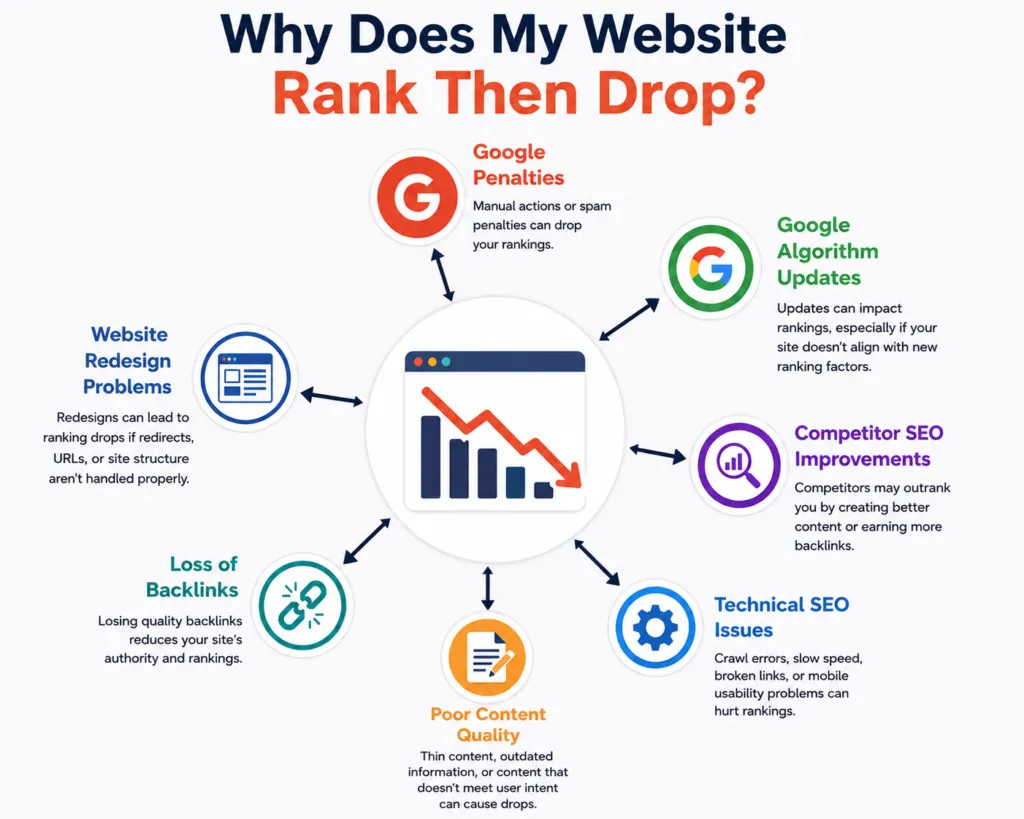
rankings shift because Google constantly re-evaluates pages against changing competition, updated algorithms, evolving search intent, and technical site health. A page that ranked well last month can lose ground if a competitor publishes something stronger, if Google’s understanding of the query changes, or if something on your site – content, links, or technical setup – quietly degrades.
That’s the short version. The longer version is that ranking is never a one-time event. Google doesn’t rank a page and then leave it alone. It’s an ongoing, ever-shifting comparison between your page and everything else trying to answer the same query. When any part of that comparison changes, your position can change with it.
Is It Normal for Google Rankings to Fluctuate?
Yes – and this is worth saying clearly before we go further: Google ranking fluctuations are normal, even expected. Search engines run algorithm tests, update their indexes, and adjust rankings on a rolling basis. A page moving from position 4 to position 7 and back to position 5 over a couple of weeks usually isn’t a red flag.
What’s worth paying attention to is a pattern: a steady decline, a sudden drop that doesn’t recover, or a loss that coincides with a known Google update. That’s different from the normal day-to-day noise every website experiences. Learning to tell the difference is the first real diagnostic skill in SEO – and it’s exactly what the rest of this guide will help you do.
Common Ranking Drop Reasons
Not every ranking drop has the same cause, which is why generic advice (“just add more content”) rarely works. Below are the most common ranking drop reasons we see across WordPress sites, roughly in the order worth checking first.
Google Algorithm Updates
Google rolls out algorithm updates throughout the year – some broad, some narrowly focused on specific quality signals like helpfulness or spam. A broad core update can reshuffle rankings across an entire niche, even for pages that didn’t change at all. If your drop lines up with a known update window, the update itself is a likely factor, not necessarily something broken on your page.
New or Better Competitor Content
Sometimes the issue isn’t your page – it’s everyone else’s. A competitor might publish a more comprehensive guide, earn stronger backlinks, or better match what searchers actually want. Google doesn’t rank pages in a vacuum; it ranks them relative to the current competition, so a static page can lose ground simply by standing still while others improve.
Search Intent Has Changed
Search intent isn’t fixed. A keyword that used to return blog-style answers might shift toward product pages, video results, or local listings as user behavior evolves. If your content format no longer matches what most searchers are looking for, Google will favor pages that do – even if your content is still accurate and well-written.
Content Quality or Relevance Issues
Outdated statistics, thin sections, or advice that no longer applies can quietly erode a page’s relevance over time. This isn’t always dramatic; it’s often a slow fade rather than a sudden fall, especially on pages that haven’t been updated in a year or more.
Technical SEO Problems
Technical SEO covers the behind-the-scenes health of your site – things like page speed, mobile usability, broken redirects, duplicate content, and Core Web Vitals (Google’s metrics for loading speed, interactivity, and visual stability). A plugin update, theme change, or hosting issue can introduce a technical problem without any obvious visual sign, and it can be enough to knock a page down several positions.
Lost or Changed Backlinks
Backlinks – links from other websites pointing to yours – remain one of the stronger trust signals in Google’s ranking system. If a site that linked to you removes the link, goes offline, or gets penalized itself, the value that link was passing to your page disappears too, sometimes taking your rankings with it.
Keyword Cannibalization
Keyword cannibalization happens when two or more pages on your own site target the same or very similar keyword, forcing Google to choose between them – and sometimes switch which one it shows, or rank both weakly. If you’ve published several posts on overlapping topics, this is worth checking early.
Poor Internal Linking
Internal linking helps Google understand which pages matter most and how your content connects. A page that loses its internal links – because of a site redesign, a menu change, or an outdated blog post rotating out of view – can lose some of the authority it was receiving from the rest of your site.
Website Changes or Redesigns
Migrating to a new theme, changing your URL structure, or launching a redesign are common (and often necessary) – but they’re also common causes of ranking drops when redirects are missed, page titles change, or content gets restructured without an SEO review beforehand.
Indexing and Crawling Problems
Indexing is the process by which Google stores your page in its database after crawling (reading) it. If a page becomes harder to crawl – due to a robots.txt change, a stray “noindex” tag, or a server error – Google may stop showing it in search results altogether, which can look identical to a ranking drop at first glance.
SERP Changes and Search Features
Sometimes your position hasn’t moved much, but your visibility has. Google increasingly fills search engine results pages (SERPs) with featured snippets, “People Also Ask” boxes, shopping results, and AI-generated overviews. These features can push organic listings down the page, reducing clicks even when your actual ranking position is stable.
Seasonality and Changes in Search Demand
Not every drop is a ranking problem – sometimes fewer people are simply searching for that term right now. Seasonal topics (holiday gift guides, tax deadlines, event-based content) naturally see demand rise and fall, and search visibility follows.
How to Find Out Why Your Website Ranking Dropped
Guessing wastes time. The fastest way to find the real cause is a structured check using data you likely already have access to.
- Open Google Search Console and go to the Performance report. Filter by the specific page or query that dropped.
- Check average position over time. A gradual decline points to content or competition; a sharp cliff points to a technical issue, algorithm update, or manual action.
- Compare impressions and clicks. Falling impressions usually mean a ranking or indexing issue. Falling clicks with stable impressions often mean a SERP feature or CTR (click-through rate) problem – your title and meta description aren’t earning the click.
- Review the Page Indexing report to confirm the page is still indexed and hasn’t been dropped, marked as duplicate, or flagged with a “noindex” issue.
- Check Google Analytics or GA4 to see whether the drop is isolated to organic search or reflects a broader traffic decline across channels.
- Manually compare the affected page against the top-ranking competitors right now. Look at content depth, format, freshness, and structure.
- Look for a date correlation between your drop and any known Google algorithm update, using Google’s own update history as a reference point.
How to Recover From an SEO Ranking Drop
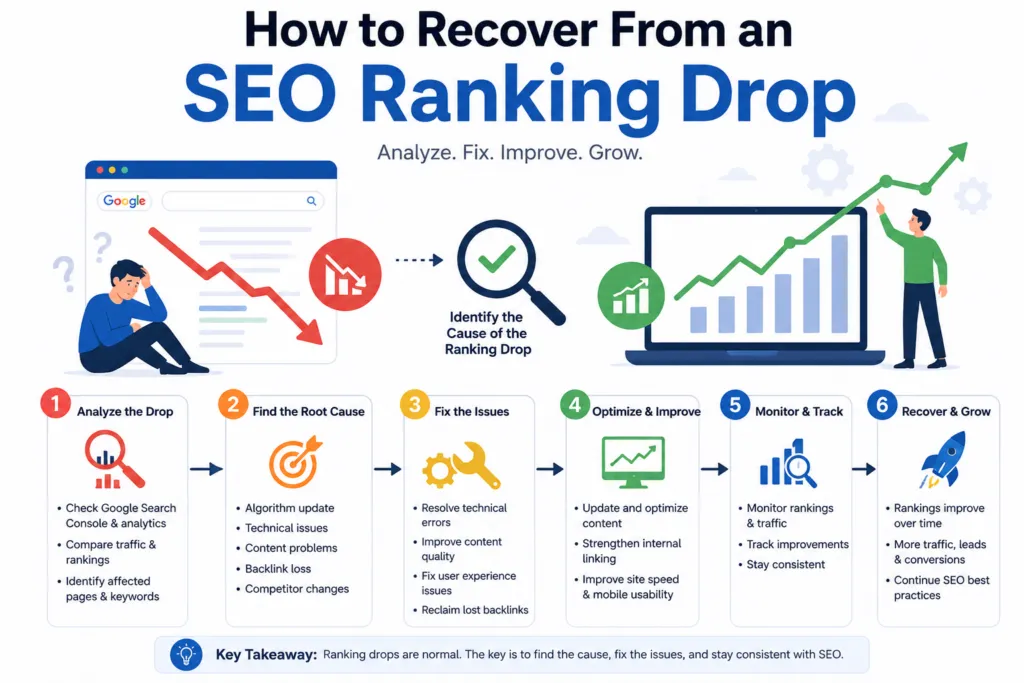
Once you know the likely cause, recovery becomes a matter of methodical fixes rather than guesswork.
- Identify the exact page and keyword affected – don’t generalize the fix across your whole site if the issue is isolated.
- Determine if the drop is sitewide or page-specific. Sitewide drops usually point to technical or algorithmic causes; single-page drops often point to content or competition.
- Check Google Search Console for manual actions, security issues, or indexing errors first – these take priority over content changes.
- Review technical health, including site speed, mobile usability, and Core Web Vitals.
- Reassess search intent for the target keyword and confirm your content format still matches what’s currently ranking.
- Update outdated content – refresh statistics, expand thin sections, and remove anything no longer accurate.
- Strengthen topical coverage by linking related content together and filling genuine content gaps, not just adding word count.
- Improve internal links pointing to the affected page from relevant, established content on your site.
- Audit your backlink profile for lost links or a sudden spike in low-quality links.
- Resolve keyword cannibalization by consolidating or clearly differentiating competing pages.
- Improve page experience – clean layout, working links, no intrusive pop-ups.
- Make one set of changes, then monitor before layering on more. Changing everything at once makes it impossible to know what actually worked.
SEO Ranking Drop vs. Normal Google Ranking Fluctuations
Not every dip is a genuine SEO ranking drop worth acting on. It helps to separate what you’re seeing into categories:
| Situation | What It Usually Looks Like | Likely Cause |
| Temporary fluctuation | Position moves a few spots, recovers within days | Normal algorithm testing/noise |
| Page-level drop | One page loses position, others stable | Content, intent, or internal linking issue |
| Sitewide drop | Multiple pages lose position at once | Technical issue, algorithm update, or manual action |
| Algorithm-related change | Drop coincides with a confirmed update rollout | Broad quality reassessment across your niche |
| Technical/indexing problem | Page missing from results entirely, not just lower | Crawling, indexing, or server error |
Reading your situation against this table before making changes can save you from “fixing” something that was never actually broken.
How Long Does It Take to Recover From a Ranking Drop?
There’s no fixed timeline, and anyone promising an exact number of days isn’t being fully honest with you. Recovery speed depends on several factors:
- The root cause – a technical fix (like removing an accidental noindex tag) can show results within days once Google recrawls the page; content or authority-related recovery usually takes longer.
- Your site’s overall authority -established sites with strong backlink profiles tend to recover faster than newer sites.
- Crawl and indexing frequency – how often Google revisits your site affects how quickly it notices your changes.
- Competition level – recovering in a competitive niche takes longer than in a low-competition one, simply because there’s more to outrank.
- The quality of the changes you make – surface-level tweaks rarely move the needle; substantive improvements to intent match, content depth, or technical health tend to perform better over time.
A realistic expectation is anywhere from a few weeks to a few months, depending on these factors. Consistent monitoring matters more than expecting an overnight bounce-back.
When Should You Hire an SEO Professional?
Plenty of ranking drops are fixable on your own, especially content or intent-related ones. Professional help starts to make more sense when:
- The decline is persistent and unexplained after your own investigation
- Traffic is falling sitewide, not just on one page
- You suspect a technical SEO issue but aren’t sure how to confirm or fix it
- You’ve recently migrated or redesigned your website
- Google Search Console is showing errors you don’t fully understand
- You’re competing in a crowded, competitive industry where small gaps matter
- You simply don’t have the internal time or SEO resources to investigate properly
This is often the point where an outside set of eyes – like the team at WP Badgers – can shortcut weeks of trial and error by running a structured technical and content audit rather than guessing at fixes one at a time.
How WP Badgers Can Help With SEO Ranking Problems
WP Badgers works specifically with WordPress websites, which means the diagnostics go straight to the platform-specific issues that generic SEO advice often misses – plugin conflicts, theme-related speed issues, and WordPress-specific indexing quirks included.
Depending on what your situation needs, that can include:
- Technical SEO audits to catch crawling, indexing, speed, and Core Web Vitals issues
- On-page SEO review to make sure titles, headings, and content structure match current search intent
- Content optimization for pages that have gone stale or thin over time
- Internal linking strategy to make sure authority flows to the pages that need it
- Keyword and search-intent analysis to confirm you’re targeting the right terms in the right format
- WordPress-specific SEO fixes, from plugin conflicts to theme-level issues
- Google Search Console analysis to interpret what the data is actually telling you
- Ranking and traffic diagnostics to pinpoint whether a drop is technical, competitive, or content-driven
- Ongoing SEO strategy for sites that want ranking stability rather than one-time fixes
None of this comes with a guarantee of a specific ranking position — no legitimate SEO service can promise that. What it does offer is a clearer, evidence-based picture of what’s actually happening on your site, and a practical plan to address it.
Not Sure Why Your Rankings Dropped?
If your WordPress site has lost rankings and you’re not sure whether the cause is technical, content-related, or simply tougher competition, that uncertainty is usually the hardest part — not the fix itself. WP Badgers can run a focused SEO audit on your site, walk you through what’s actually driving the drop, and help you build a recovery plan based on your specific data rather than generic checklists. Request an SEO assessment to get a clear starting point instead of more guesswork.
Frequently Asked Questions
Why does my website rank on Google and then disappear?
This usually happens due to indexing issues, a technical error like an accidental noindex tag, a lost backlink, or a broader algorithm update reassessing your page’s relevance. Checking the Page Indexing report in Google Search Console is the fastest way to confirm whether the page dropped in rank or was removed from the index entirely.
Why does my Google ranking keep changing?
Minor, ongoing Google ranking fluctuations are normal and reflect regular algorithm testing, shifting competition, and changing search behavior. If your position moves within a small range and generally trends stable, there’s usually no cause for concern.
How long do Google ranking fluctuations last?
Minor fluctuations often resolve within days. Fluctuations tied to a confirmed algorithm update can take a few weeks to fully settle as Google finishes rolling it out and reassessing affected pages.
Why did my website suddenly lose rankings?
A sudden, sharp drop is often technical — a crawling or indexing error, a broken redirect, a site migration issue, or occasionally a manual action. Sudden drops are worth investigating faster than gradual ones, since the cause is often easier to isolate.
Can updating content cause rankings to drop?
Yes, occasionally. If an update changes the page’s focus, removes previously relevant sections, or shifts the format away from what’s currently ranking for that intent, it can temporarily affect rankings. This is usually short-lived if the update genuinely improved the content’s quality and relevance.
How do I recover from an SEO ranking drop?
Start by identifying the exact cause using Google Search Console data, then address it directly — whether that’s fixing a technical issue, updating outdated content, or resolving keyword cannibalization. Recovery typically comes from targeted fixes, not broad, unfocused changes.
Does a Google algorithm update affect every website?
No. Broad core updates affect search results across many niches, but not every website is impacted the same way, and some sites may even see gains. Impact depends heavily on the specific quality signals the update is targeting.
Should I change my page immediately after a ranking drop?
Not right away. It’s worth taking a few days to confirm whether the drop is a temporary fluctuation before making changes, since reacting too quickly can make it harder to identify the real cause later.
Want a Free WordPress SEO Audit?
If your rankings keep rising and falling and you’re tired of guessing why, WP Badgers offers a free WordPress SEO audit to help you pinpoint the real issue- technical, content, or competitive. Contact WP Badgers today to get a clear, no-obligation look at what’s really happening with your rankings.