
![Why Is My Website Not Showing Up on Google [Guide to Fixing]](https://wpbadgers.com/wp-content/uploads/2026/02/Why-Is-My-Website-Not-Showing-Up-on-Google-Guide-to-Fixing.png)
You finally hit “Publish.” After weeks of fine-tuning your website, rewriting the copy for what feels like the tenth time, and picking out the perfect brand colors, your business is finally live.
Naturally, the first thing you do is search for your company on Google, expecting to see your website right there.
But… nothing, Not on the first page. Not on the fifth. Honestly, it can start to feel like your website is hiding in some forgotten corner of the internet where nobody can find it.
If you’ve ever felt that sinking feeling, trust me, you’re definitely not alone. I’ve seen plenty of small business owners go through the exact same thing. You put in the time, effort, and money to build a great website, but somehow, Google seems to be ignoring it while your competitors keep showing up in the search results.
And let’s be real-that’s frustrating,Every day your business isn’t showing up where potential customers can find it is another day those customers may end up choosing someone else instead.
But here’s the thing: Google isn’t ignoring your website on purpose. Search engines don’t play favorites. They follow certain rules and signals to decide which websites deserve to appear in the search results.
So, if your website isn’t ranking, there’s usually a reason behind it. Maybe there’s a technical issue holding it back. Maybe your site structure needs some work. Perhaps some important SEO basics are missing, or maybe your website simply hasn’t built enough authority yet for Google to see it as a trustworthy source.
The good news? These problems can be identified and fixed, Once you understand what’s actually holding your website back, you can stop guessing and start making changes that genuinely improve your visibility. And, little by little, that can help more potential customers discover your business online.
What is a Google Indexing Issue?
A website not showing up on Google typically means the site has not been indexed or is being filtered out due to quality and technical signals.
Indexing is the process where Google’s “spiders” crawl your site, analyze the content, and store it in a massive database to be served to users.
- Crawling: Google finds your pages.
- Indexing: Google understands and stores your pages.
- Ranking: Google decides where to place you in the results.
The Ghost Town Effect: Why Your Business is Hiding
Imagine Sarah, a boutique florist who spent $5,000 on a beautiful custom website. Three months later, she searched for “Sarah’s Floral Design” on Google, only to find her Instagram profile—but not her actual website.
Naturally, she was frustrated. She started thinking, “Do I really have to pay for ads just to get people to find me?”
But when her site was checked, the problem turned out to be surprisingly simple. There was a tiny piece of code—a “noindex” tag-left behind from the developer’s staging site. That one line was basically telling Google, “Don’t show this website in search results.”
Once it was removed, Sarah’s site started showing up. Within 48 hours, she was ranking #1 for her own business name.
And honestly, this happens more often than you might think.
Most website visibility problems aren’t some big, complicated mystery. A lot of the time, they come down to a simple technical issue that’s easy to fix once you know where to look.
So, let’s go through some of the most common reasons your website might not be showing up on Google—and what you can do about them.
1. Your Site is Too New
Google’s index is trillions of pages large. It can take anywhere from a few days to several weeks for a brand-new site to be crawled and indexed. If you launched 48 hours ago, patience is your only requirement.
2. You’ve Accidental Blocked Search Engines
This is the “Sarah scenario.” Many website builders or developers use a “noindex” tag while building a site so the public doesn’t see a half-finished product. If you forget to remove it, you’ve essentially told Google, “Please stay away.”
3. The Lack of “Sitemap” Communication
Google needs a map to navigate your site efficiently. Without an XML sitemap submitted through Google Search Console, the search engine has to find your pages through links—and if you don’t have many links yet, it might never find the deeper pages of your site.
4. Technical Penalties or Manual Actions
While rare for small businesses, if you’ve used “shady” tactics like buying thousands of cheap links or scraping content from other sites, Google may have actively removed you from the index to protect users.
The Step-by-Step Recovery Plan
If your site is missing, follow this protocol to diagnose and repair the connection between your business and the search results.
Step 1: Perform a “Site:” Search
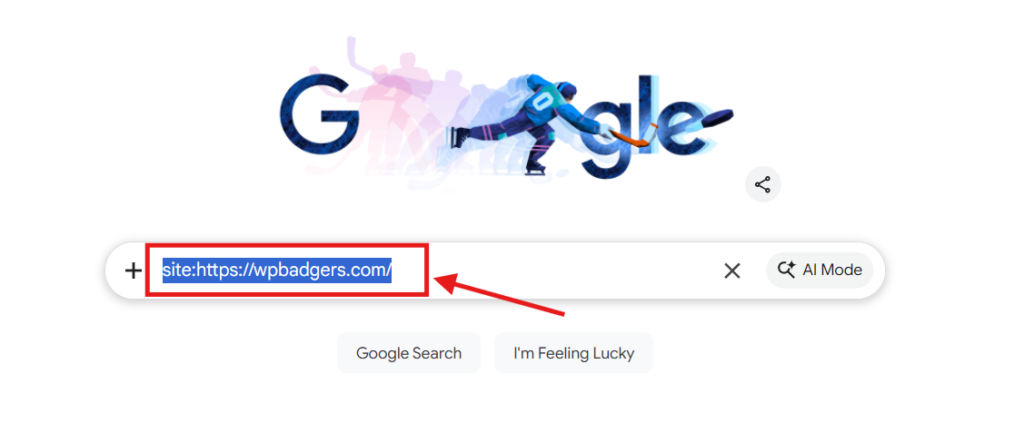
Go to Google and type site:yourwebsite.com into the search bar. This tells you exactly how many pages Google has in its index for your domain. If zero results appear, you have an indexing problem. If pages appear but they aren’t ranking for your keywords, you have a ranking problem.
Step 2: Verify Google Search Console (GSC)
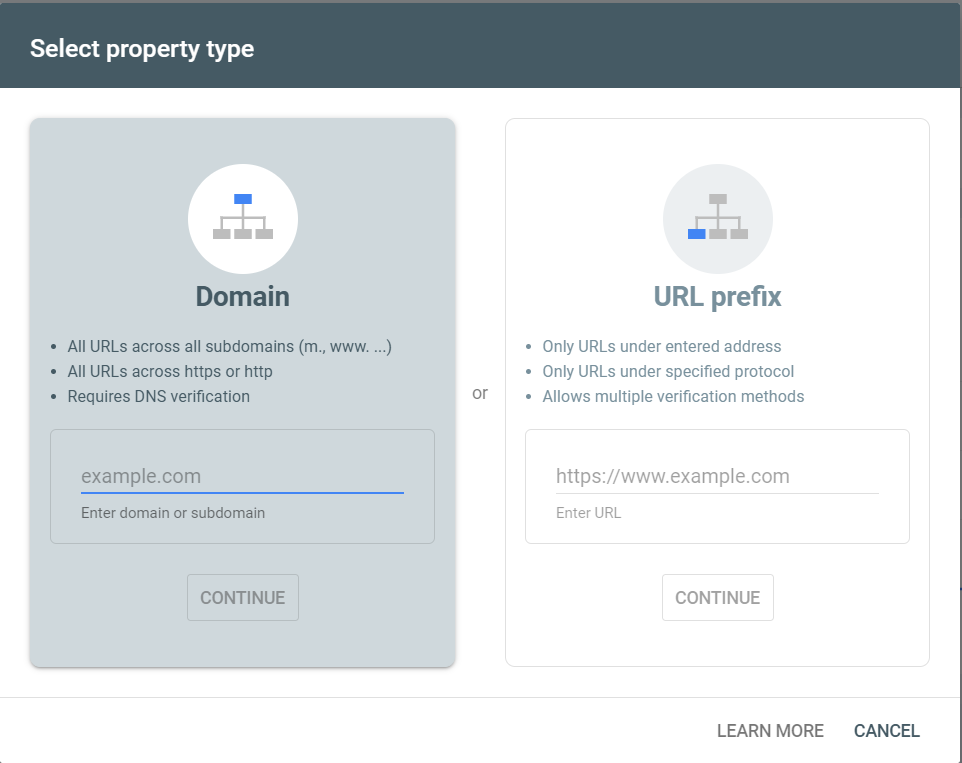
This is the only way to “talk” to Google. Create a free account, verify your domain, and check the “Index Coverage” report. This report will explicitly tell you if pages are being excluded and why.
Step 3: Check Your Robots.txt File
Visit yourwebsite.com/robots.txt. If you see a line that says Disallow: /, you are telling every search engine on earth to ignore your entire website. You’ll need to edit this file or change your CMS settings (like the “Search Engine Visibility” checkbox in WordPress) to fix it.
Step 4: Request Manual Indexing
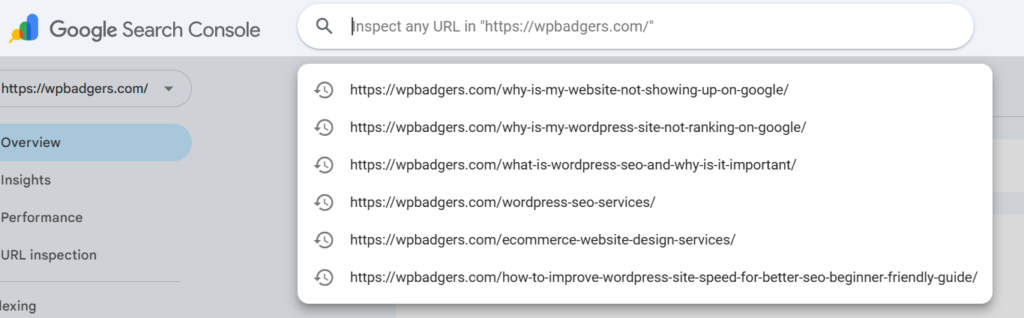
In GSC, you can paste a specific URL into the top search bar and click “Request Indexing.” This puts your page in a priority queue for Google to visit.
👉 If you are confused about whether WordPress is still SEO friendly, check out our guide on Is WordPress Good for SEO in 2026? Pros, Cons & Truth before making a decision.
Common Mistakes Small Businesses Make
The biggest error I see is content thinness. Small business owners often create a “Services” page that is just a bulleted list of five items with no description. Google wants to provide value to its users.
If your page has 50 words on it, Google might decide it’s not “high quality” enough to deserve a spot in the index.
Another trap is ignoring mobile usability. We are in a mobile-first indexing world. If your site looks like a desktop site from 2005 on a smartphone, Google will penalize your visibility across all devices.
The Insider Tip: The Power of the Google Business Profile
If you are a local business, your website is only half the battle. Often, the reason you “don’t show up” is that you haven’t claimed your Google Business Profile (formerly Google My Business).
Here is the secret: Google often prioritizes the “Map Pack” (the three local businesses shown at the top) over traditional blue links for local searches. If you haven’t optimized your profile with photos, reviews, and a physical address, you’re missing the easiest way to appear on page one.
My Bold Opinion: Stop Worrying About Keywords and Start Worrying About Worth
Most people think SEO is about “tricking” Google with the right keywords. It’s not. Google is a giant recommendation engine. If Google recommends a bad website to a user, that user loses trust in Google.
If you want to show up, stop asking “How do I rank?” and start asking “Does my website deserve to be the first thing a human sees when they ask this question?” If your site is slow, hard to read, or lacks real information, the answer is no.
Frequently Asked Questions
Why is my website not appearing in Google Search?
Your website may be missing due to a “noindex” tag in your code, a lack of an XML sitemap, or a robots.txt file that blocks crawlers. New websites also take time to be discovered. Ensure you have registered your site with Google Search Console to track status.
How long does it take for Google to index a new site?
Typically, it takes between 4 days and 4 weeks for Google to index a new website. This timeframe can be shortened by manually submitting your URL via Google Search Console and ensuring you have high-quality internal and external links pointing to your pages.
Can a slow website stop Google from indexing it?
While speed is primarily a ranking factor rather than an indexing factor, extremely slow load times can cause “crawl timeouts.” If Google’s bot can’t load your page within a reasonable timeframe, it may give up and move on, leaving your page unindexed.
Why did my website disappear from Google suddenly?
A sudden disappearance usually signals a manual penalty, a technical “crawl error” introduced during a site update, or a major algorithm change. Check the “Manual Actions” tab in Google Search Console to see if Google has flagged your site for violations.
Reflecting on the Digital Horizon
Visibility is everything in today’s online world. When your website isn’t showing up, it can honestly feel like you’re talking, but no one can hear you. And the thing is, the internet is always changing, so your visibility can change too.
If sitemaps, crawl errors, and all that technical SEO stuff feel confusing or overwhelming, don’t worry—you don’t have to figure it all out on your own. At WP Badgers, we help businesses fix the technical issues that can keep their websites from being seen. Basically, we make it easier for search engines to find and understand your site, so the right people can actually discover your business when they’re looking for what you offer.
Get Started Today
We are always here to
help you achieve the unimaginable

The goal isn’t just to be found; it’s to be the answer your customers have been searching for. Is your website ready to be that answer?
Would you like me to analyze your specific URL to see if there are any obvious “noindex” tags or technical blocks preventing your site from appearing?