You refreshed Search Console for the third time.
Still no impressions.
You installed the plugin. You wrote the blog. You even shared it on social media. Yet your WordPress site feels invisible.
If your WordPress SEO is not working, you are not alone. I have seen this pattern many times. Smart people do the “right things,” but the rankings never move.
The frustration is real. You start questioning everything. Is the SEO plugin broken? Is Google ignoring your website? Did you choose the wrong theme?
Let’s break this down properly.
Not in theory.
But in practical terms you can act on today.
What Does “WordPress SEO Not Working” Actually Mean?
WordPress SEO not working usually means your website is not ranking, not indexed, losing traffic, or not appearing in search results despite using SEO plugins and optimizing content. The issue typically comes from technical errors, indexing settings, poor site structure, or weak content relevance rather than the plugin itself.
In most cases, the plugin is not the problem.
The setup is.
To choose the right design for rankings, read our detailed guide on Best SEO-Friendly WordPress Themes in 2026 (Tested for Speed).
Why Your WordPress Site Isn’t Ranking Even After Installing an SEO Plugin
Installing tools like Yoast SEO or Rank Math does not automatically improve rankings. They help you optimize. They do not rank your site.
Here is what is usually happening behind the scenes.
1. Your Site Is Blocking Search Engines
Go to:
Settings → Reading → “Discourage search engines from indexing this site”
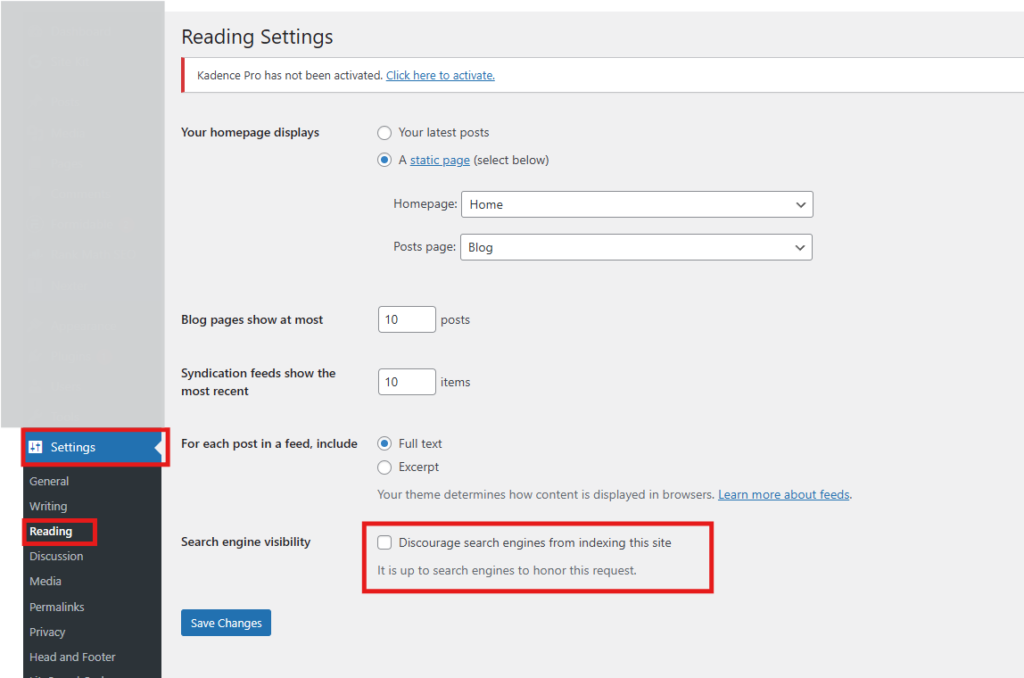
If this is checked, Google will struggle to index your pages.
It sounds obvious. But you would be surprised how often this is the reason behind WordPress ranking problems.
2. Your Pages Are Not Indexed
If your pages are not indexed, they cannot rank. Use Google Search Console and inspect the URL to check indexing status. If it says “Crawled but not indexed” or “Discovered but not indexed,” your issue is likely content quality, site authority, or crawl budget limitations.
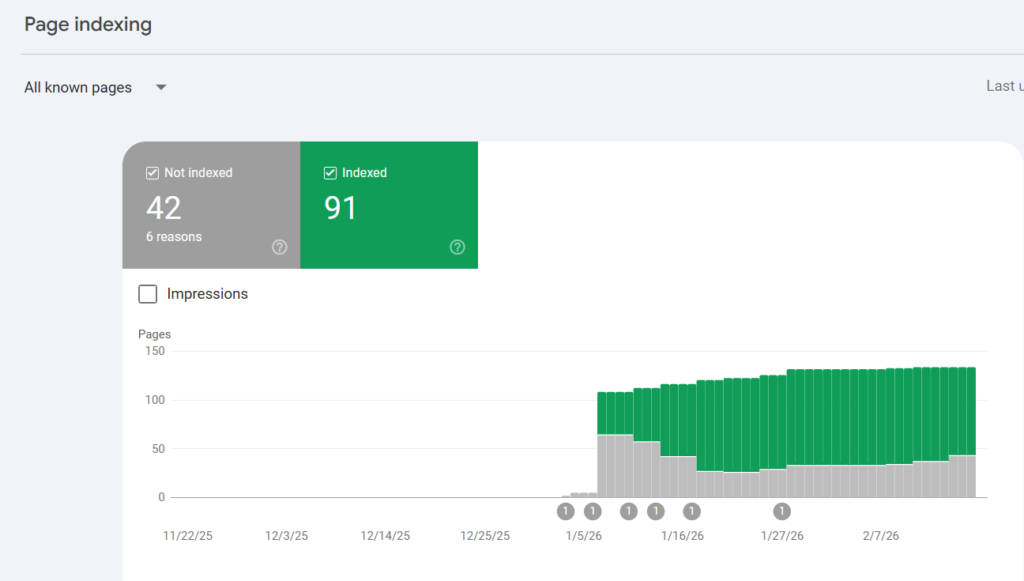
Search Console is your first diagnostic tool. Not your plugin dashboard.
3. Technical SEO Is Broken
Your SEO plugin can generate meta tags.
It cannot fix:
- Slow page speed
- Poor hosting
- JavaScript rendering issues
- Broken internal links
- Duplicate URLs
- Incorrect canonical tags
These technical issues silently kill rankings.
Common Reasons WordPress SEO Is Not Working
Here is a practical breakdown.
Thin Content
If your article is 400 words competing against 2000-word in-depth guides, you already know the outcome.
Google ranks depth, clarity, and usefulness.
No Topical Authority
One blog post on SEO will not rank if your website has no related supporting content.
Search engines look at topical clusters. Not isolated articles.
Weak Internal Linking
Internal links help distribute authority and help search engines understand structure.
Many WordPress users forget this completely.
Poor Keyword Targeting
Are you targeting keywords with:
- Extremely high competition?
- No search intent match?
- No search volume?
That is not an SEO plugin issue. That is a strategy issue.
Step-by-Step: How to Fix WordPress SEO Issues Fast
Let’s make this practical.
Follow this sequence carefully.
Step 1: Check Indexing First
- Open Google Search Console
- Use URL Inspection tool
- Confirm page is indexed
- Request indexing if needed
If not indexed, solve that before touching anything else.
Step 2: Audit Technical Setup
Check:
- XML sitemap submitted
- Noindex tags removed
- Robots.txt not blocking pages
- Canonical URLs correct
- HTTPS active
- Page speed under 3 seconds
Tools you can use:
- Google Search Console
- PageSpeed Insights
- Screaming Frog
- GTmetrix
Technical health is foundation. Without it, content will not perform.
Step 3: Improve Content Depth
Ask yourself:
- Does this page solve the entire query?
- Did I answer related sub-questions?
- Did I include examples?
- Did I provide actionable steps?
If not, update it.
Sometimes SEO is not working because content is incomplete.
Step 4: Fix Internal Linking
Add:
- 3 to 5 contextual internal links
- Clear anchor text
- Links to relevant supporting content
This helps search engines understand site hierarchy.
Step 5: Improve E-E-A-T Signals
Google evaluates:
- Author credibility
- Clear expertise
- Real experience
- Transparent information
Add:
- Author bio
- Real insights
- Practical examples
- About page clarity
Bold opinion: Most WordPress users blame plugins when the real problem is weak expertise signals.
Is Your SEO Plugin Not Working?
An SEO plugin not working usually means it is installed but not configured properly. Common issues include missing sitemap submission, incorrect meta settings, disabled schema, or conflicting plugins. The plugin provides tools, but results depend on strategic implementation and content quality.
Check:
- Sitemap URL working?
- Titles and meta descriptions properly set?
- Schema enabled?
- Plugin updated?
Also ensure no duplicate SEO plugins are active simultaneously.
One Common Mistake Most Bloggers Make
They keep publishing new content instead of fixing existing content.
If 20 pages are not ranking, adding 5 more will not fix it.
Update old posts.
Improve structure.
Add depth.
Strengthen internal links.
That often moves rankings faster than publishing something new.
Insider Tip Most Blogs Don’t Tell You
Look at the top 3 ranking pages for your keyword.
Not to copy.
To map search intent.
Are they:
- How-to guides?
- Comparison posts?
- List articles?
- Case studies?
If your format does not match intent, rankings will struggle.
SEO is not just optimization. It is alignment.
What to Do If Your WordPress Rankings Suddenly Dropped
Direct Answer (50 words)
If your WordPress rankings suddenly dropped, check for recent Google updates, technical errors, lost backlinks, or major site changes. Compare traffic in Google Analytics and Search Console. Sudden drops are usually caused by algorithm updates, indexing issues, or content quality signals shifting.
Ask:
- Did you change theme?
- Did you migrate hosting?
- Did you delete content?
- Did competitors improve?
Sometimes the issue is external.
If your site is not appearing in search results, read our complete guide on Why Is My Website Not Showing Up on Google? Guide to Fixing.
Quick Technical Checklist to Fix SEO Issues
Use this as a rapid audit list:
- Site visible to search engines
- Pages indexed
- Sitemap submitted
- No duplicate meta tags
- Mobile friendly design
- Core Web Vitals acceptable
- Clear internal linking
- Proper heading structure
- Target keyword aligned with intent
If even three of these are broken, rankings can stall.
Frequently Asked Questions
Why is my WordPress site not showing on Google?
If your WordPress site is not showing on Google, it may not be indexed, blocked by noindex settings, recently launched, or lacking authority. Check Search Console first. Ensure sitemap submission and remove any indexing restrictions in settings or robots.txt.
How long does it take for WordPress SEO to work?
WordPress SEO typically takes 4 to 12 weeks to show measurable results depending on competition, domain age, and content quality. Technical fixes can improve indexing quickly, but ranking improvements require consistent authority and optimization.
Can a theme affect WordPress SEO?
Yes. A poorly coded or slow theme can negatively affect SEO through slow load speed, poor mobile responsiveness, and messy HTML structure. Lightweight themes usually perform better for technical SEO and Core Web Vitals.
Why is my SEO plugin showing green but I am not ranking?
SEO plugin scores are guideline-based. They evaluate on-page optimization but not competition, authority, backlinks, or search intent alignment. A green score does not guarantee ranking because Google evaluates many more factors.
You do not need another plugin.
You need clarity.
If you are stuck choosing the right theme, optimizing structure, or fixing deeper WordPress ranking problems, sometimes an outside audit saves months of trial and error.
Need help choosing and optimizing your theme? Explore my WordPress SEO services.
Get Started Today
We are always here to
help you achieve the unimaginable

Because sometimes the issue is not that SEO is not working.
It is that the foundation was never fully built.
And once that foundation is right, everything starts compounding quietly.
![Why Is My Website Not Showing Up on Google [Guide to Fixing]](https://wpbadgers.com/wp-content/uploads/2026/02/Why-Is-My-Website-Not-Showing-Up-on-Google-Guide-to-Fixing-768x432.png)
![How to Perform a WordPress SEO Audit [Step-by-Step Guide for Beginners]](https://wpbadgers.com/wp-content/uploads/2026/01/How-to-Perform-a-WordPress-SEO-Audit-Step-by-Step-Guide-for-Beginners-768x432.png)