
If you have a WordPress website but it’s not ranking on Google, you’re probably confused about what kind of SEO you actually need.
Many beginners hire general SEO services and still don’t see results—because WordPress has its own technical and structural requirements.
This blog will clearly explain WordPress SEO Services vs General SEO Services, so you can choose the right solution without wasting time or money.
What Is the Difference Between WordPress SEO Services and General SEO Services?
WordPress SEO Services vs General SEO Services refers to the difference between SEO done specifically for WordPress websites and SEO applied broadly across any platform.
WordPress SEO focuses on themes, plugins, core settings, and CMS-specific issues, while general SEO applies standard strategies that may not fully optimize a WordPress site.
Why Does This Problem Matter?
How This Problem Affects Users
Choosing the wrong SEO service directly impacts your website’s growth. I’ve seen WordPress site owners pay for general SEO and still struggle with poor rankings, slow pages, and indexing issues.
This leads to wasted money, low traffic, missed leads, and frustration—especially for beginners who trust experts blindly.
Common Myths or Misunderstandings
Many people believe SEO is the same for every website. This is outdated thinking. While Google’s core principles are universal, WordPress websites require platform-specific optimization.
Another myth is that installing an SEO plugin like Yoast automatically fixes everything—it doesn’t, unless configured properly.
Read More: Is WordPress Good for SEO in 2026? [Pros, Cons & Truth]
Common Challenges People Face With WordPress SEO vs General SEO
Beginners often face these real-world problems when the SEO approach doesn’t match their platform:
- SEO agencies ignore WordPress-specific issues like theme bloat or plugin conflicts
- Incorrect setup of Yoast SEO or Rank Math
- Slow page speed due to unoptimized WordPress hosting
- Poor Core Web Vitals despite “SEO work”
- Technical SEO errors not visible without WordPress knowledge
Ignoring these challenges can result in stagnant rankings, poor user experience, and Google indexing problems.
How to Optimize SEO in Your WordPress Website
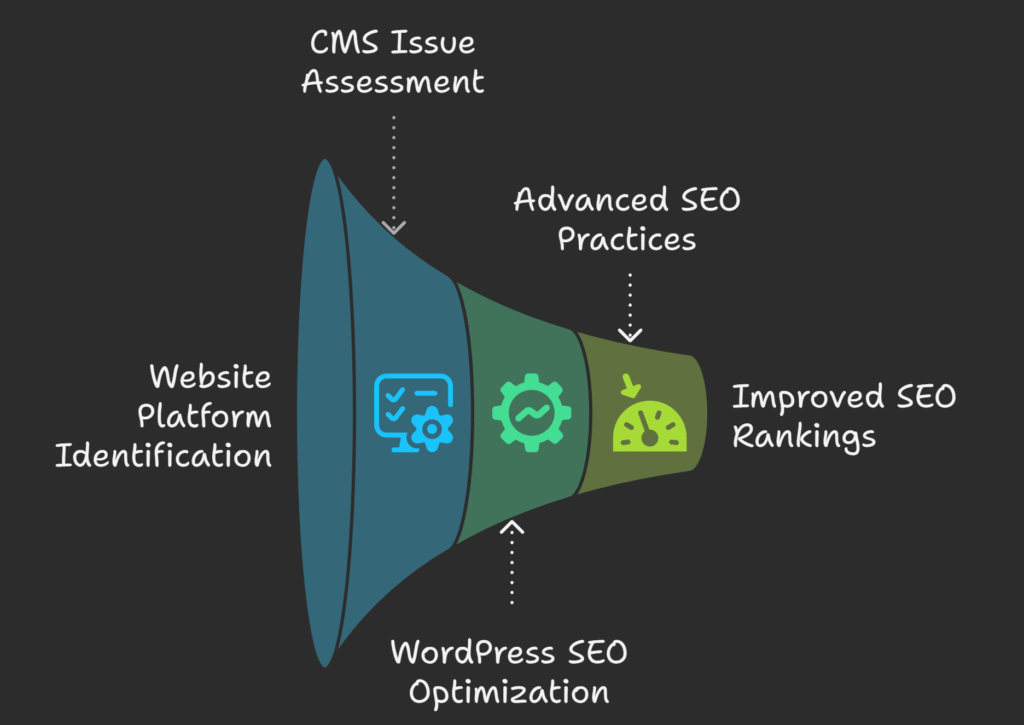
Step 1 – Identify Your Website Platform and Needs
Before choosing any SEO service, confirm whether your website is built on WordPress.
What to do:
Check your CMS and list current issues using Google Search Console and PageSpeed Insights.
Why it works:
WordPress SEO Services are designed to fix CMS-level problems like permalink structure, XML sitemaps, and plugin conflicts—things general SEO often misses.
Step 2 – Apply WordPress-Specific SEO Optimization
Once confirmed, focus on SEO actions tailored for WordPress.
How to apply it correctly:
Use tools like Yoast SEO, Rank Math, or All in One SEO for proper meta setup, schema, and sitemaps.
Common mistakes to avoid:
- Installing multiple SEO plugins
- Leaving default settings unchanged
- Ignoring WordPress theme performance
General SEO services often skip these CMS-level optimizations.
Step 3 – Follow Advanced WordPress SEO Best Practices
Advanced WordPress SEO goes beyond basics.
Expert insight:
In my experience optimizing WordPress sites, improvements in Core Web Vitals using lightweight themes (like Astra or GeneratePress) and caching plugins (WP Rocket) significantly improved rankings within weeks. This level of optimization is rarely handled by general SEO providers.
Want to know about Top WordPress SEO Optimization Techniques for 2026 (Beginner-Friendly Guide)
WordPress SEO Services vs General SEO Services: Simple Comparison
- WordPress SEO Services:
- Platform-specific
- Plugin, theme, and CMS optimization
- Better for WordPress websites
- General SEO Services:
- Platform-agnostic
- Focus on backlinks and keywords
- May ignore technical CMS issues
For WordPress users, specialized services usually deliver faster and more sustainable results.
FAQs About WordPress SEO Services vs General SEO Services
Why is WordPress SEO different from general SEO?
WordPress SEO involves optimizing themes, plugins, site structure, and CMS settings. General SEO focuses on broader strategies and may not address WordPress-specific technical issues that affect rankings.
What mistakes make WordPress SEO worse?
Common mistakes include installing too many plugins, using heavy themes, misconfiguring SEO plugins, and hiring general SEO agencies unfamiliar with WordPress internals.
How long does it take to see results with WordPress SEO?
Typically, noticeable improvements appear within 2–3 months, depending on competition, content quality, and technical fixes applied using tools like Google Search Console and Ahrefs.
Are there risks in choosing the wrong SEO service?
Yes. Using general SEO services for a WordPress site can lead to unresolved technical errors, slow performance, and wasted budget with little ranking improvement.
What should I avoid while fixing WordPress SEO issues?
Avoid blindly following generic SEO advice, changing themes frequently, or relying only on plugins without expert configuration and ongoing monitoring.
Final Thoughts on WordPress SEO Services vs General SEO Services
Key takeaways:
- WordPress websites need WordPress-focused SEO
- General SEO may miss critical CMS issues
- Plugins alone don’t replace expert optimization
- Platform-specific SEO delivers better long-term results
If your site runs on WordPress and rankings matter to you, WordPress SEO Services are the smarter choice.
Apply the steps above or consult a WordPress SEO expert to fix issues correctly and grow your organic traffic with confidence.
Get Started Today
We are always here to
help you achieve the unimaginable


![Why Is My Website Not Showing Up on Google [Guide to Fixing]](https://wpbadgers.com/wp-content/uploads/2026/02/Why-Is-My-Website-Not-Showing-Up-on-Google-Guide-to-Fixing-768x432.png)
![How to Perform a WordPress SEO Audit [Step-by-Step Guide for Beginners]](https://wpbadgers.com/wp-content/uploads/2026/01/How-to-Perform-a-WordPress-SEO-Audit-Step-by-Step-Guide-for-Beginners-768x432.png)